플랫폼 상태 아이콘
Aria의 플랫폼 상태 이미지는 현재 base mark와 runtime status variation을 분리합니다. 현재 base mark는 filled rounded right-isosceles body와 flight dot을 함께 가진 Stream Mark입니다. 기획 이미지는 platform별 상태 표현의 방향 참고로 둡니다.
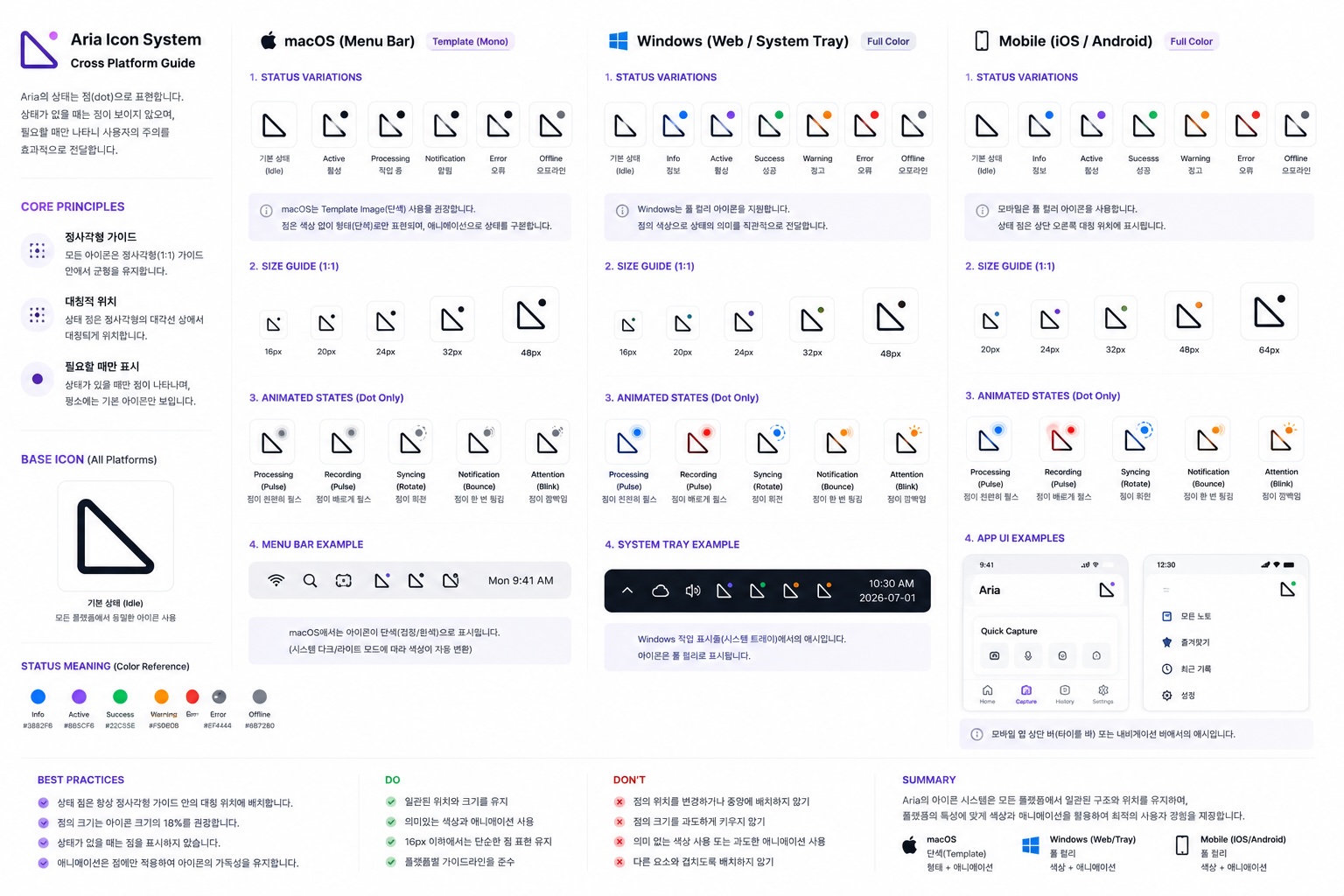
- Base icon은 모든 플랫폼에서 같은 1:1 정사각형 가이드 안에 둡니다.
- 기본 브랜드 로고는 filled rounded right-isosceles body와 flight dot을 포함합니다.
- flight dot은 runtime status badge가 아니라 기본 Stream Mark의 일부입니다.
- runtime status는 base mark를 대체하지 않고, 상태 전용 자산에서 관리합니다.
- 상태 의미는 색상만으로 전달하지 않고 shape, 위치, label을 함께 사용합니다.
- status symbol placement는 플랫폼마다 바꾸지 않습니다.
플랫폼별 방향
Section titled “플랫폼별 방향”| 플랫폼 | 방향 | 이유 |
|---|---|---|
| macOS menu bar | template mono | 시스템 다크/라이트 모드에 자연스럽게 반응해야 함 |
| Windows / Web / System tray | full color | 상태색으로 정보, 활성, 성공, 경고, 오류를 빠르게 구분 |
| Mobile | full color | 상단 bar와 app UI에서 상태 dot이 작게 보여도 읽혀야 함 |
| 상태 | 시각 신호 | 의미 |
|---|---|---|
| Idle | base mark with flight dot | 주의할 일이 없음 |
| Info | blue dot | 정보 또는 안내 |
| Active | purple dot | 활성 상태 |
| Success | green dot | 성공 또는 완료 |
| Warning | orange dot | 검토 또는 주의 필요 |
| Error | red dot | 실패, 인증, 권한, 실행 오류 |
| Offline | gray dot | 오프라인 또는 연결 불가 |
Source assets
Section titled “Source assets”공통 source SVG는 packages/design-tokens/src/assets/brand/에 둡니다.
| Asset | Role |
|---|---|
aria-mark.svg | filled body + flight dot source for header, wordmark, mask icon |
aria-app-icon.svg | status-free rounded square launcher and favicon source |
aria-tray-template.svg | filled body + flight dot macOS tray/menu bar template source |
status-icons/{platform}/{status}.svg | runtime status icon source |
Do / Don’t
Section titled “Do / Don’t”- Do: status dot은 정사각형 가이드의 상단 대각 위치에 둡니다.
- Do: 16px에서도 단순한 점 표현을 유지합니다.
- Do: 플랫폼별 색상 표현은 달라도 구조와 위치는 고정합니다.
- Don’t: status dot을 중앙에 두거나 매 플랫폼마다 위치를 바꾸지 않습니다.
- Don’t: 상태 의미를 색상 하나에만 의존하지 않습니다.